
Content Marketing Automation: A Small Business Guide
Learn how content marketing automation can streamline your workflow, save time, and boost engagement. A practical guide for small businesses in 2026.
France's marketing automation market was valued at USD 2,341.3 million in 2025 and is projected to reach USD 4,210 million by 2030, implying a 12.5% CAGR over that period, according to MarketsandMarkets' France market data. Yet automation still feels out of reach for many small business owners.
That hesitation is understandable. A three-person team doesn't need an enterprise maze of dashboards, integrations, and approval chains. It needs a reliable way to turn one useful idea into a blog article, an email, a social post, an FAQ, or a product update without repeating the same manual work every week.
The practical version of content marketing automation is simple: software handles predictable tasks, while people remain responsible for strategy, accuracy, judgement, and brand voice. The right setup won't replace your expertise. It will protect your time so you can use it where customers need you.
Why Content Marketing Automation Matters for Small Businesses
The French adoption gap makes the opportunity clear. In a 2023 survey, 56% of marketing managers said automated marketing tools would save 2 to 4 hours of work per week per employee, while only 16% said they were using them, as reported by Leader Réunion's coverage of the survey. For a small company, that gap isn't proof that automation doesn't work. It suggests that many teams recognise the problem but haven't built a manageable solution.

What automation actually removes
Content marketing automation doesn't mean publishing machine-written articles without review. It means connecting the tasks around content production:
- Planning: Store ideas, briefs, keywords, seasonal topics, and deadlines in one place.
- Repurposing: Turn an approved blog post into social captions, an email introduction, or an FAQ draft.
- Distribution: Schedule finished content to the channels your customers already use.
- Follow-up: Send a relevant resource after someone completes a form or requests information.
- Reporting: Collect performance information without rebuilding the same spreadsheet every month.
The best starting point is a repetitive task that follows a clear rule. If a blog post becomes a LinkedIn update after approval, that handoff can be automated. If a sensitive customer complaint needs nuance, it should remain human-led.
Small teams often lose time through context switching rather than writing itself. Someone copies a headline into a social scheduler, searches for the right image, reformats the text, remembers to add a link, then chases approval. A lightweight workflow removes those handoffs and creates a consistent publishing rhythm.
Practical rule: Automate the path content follows, not the judgement that makes the content worth reading.
For a useful breakdown of the marketing benefits of content automation, focus on the operational details rather than promises of effortless growth. Automation works when it reduces friction around content that already has a clear purpose.
Planning Your Content Automation Strategy
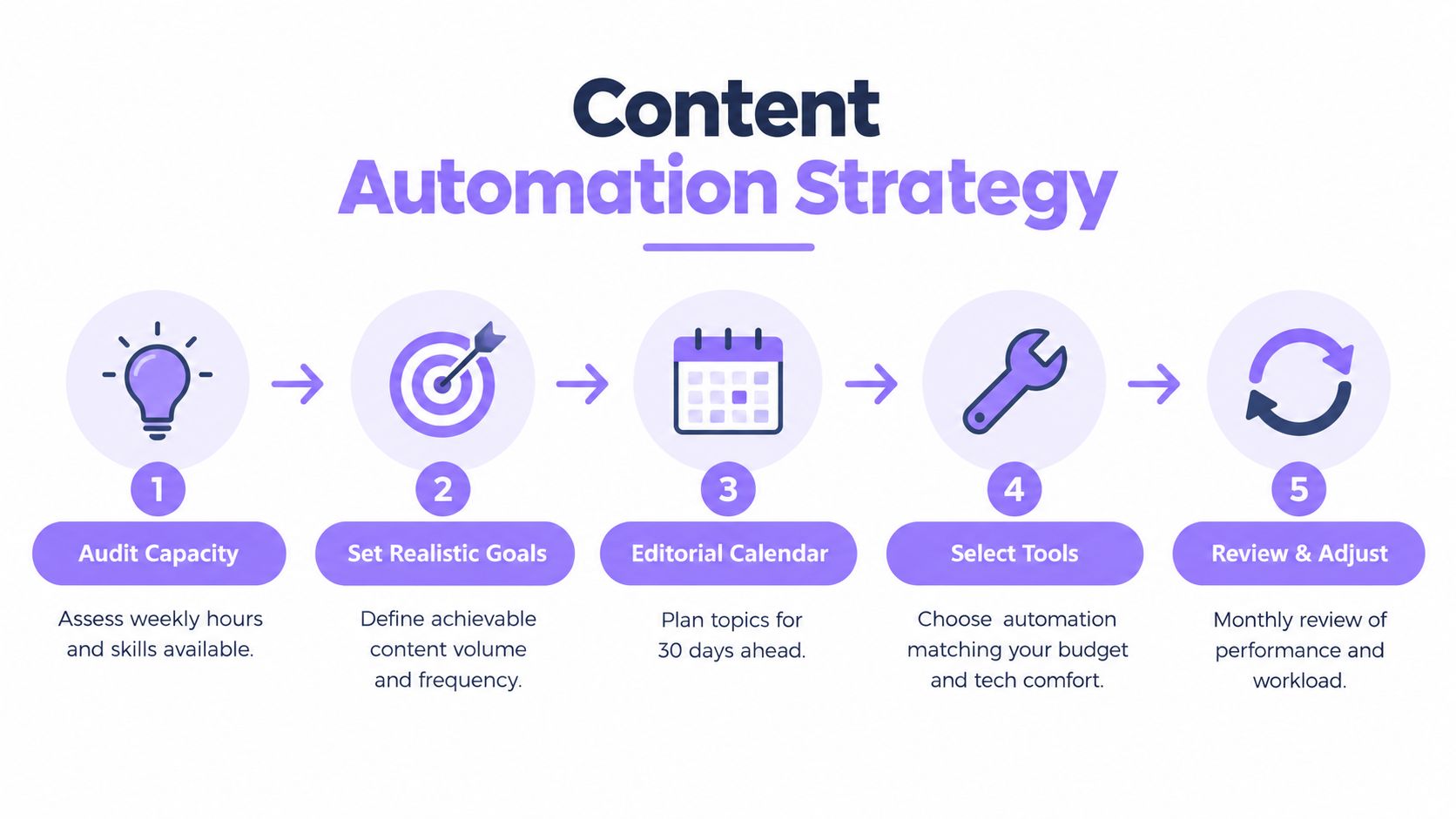
Start with capacity, not ambition. Write down the hours your team can realistically dedicate to content each week, who can approve claims, who understands customers, and which person owns publishing. If the plan requires more effort than your team can sustain, no platform will rescue it.
Choose content that earns its place
Match each format to a business objective:
- Blog articles support search visibility when customers ask recurring questions.
- FAQs help clarify services, buying conditions, delivery details, and local expertise.
- Product or service pages address objections and improve decision-making.
- Email content keeps existing prospects and customers informed.
- Reviews and customer stories provide evidence that your offer delivers what it promises.
- Social posts extend the life of useful ideas, but they shouldn't become a separate full-time job.
Choose one primary format and one distribution channel first. A local tradesperson may prioritise service FAQs and Google Business Profile updates. An online retailer may prioritise product information, buying guides, and post-purchase email content. A consultant may get more value from problem-led articles and a short newsletter than from trying to maintain every social network.
The marketing content automation essentials are easier to apply when every workflow has a defined audience, source material, owner, and review step.
Build a calendar your team can maintain
A useful calendar doesn't need to be elaborate. Include the topic, target customer, format, responsible person, status, publication date, source links, and next distribution action. Add seasonal events only when they matter to your customers. A bakery, estate agent, and software consultant shouldn't use the same planning logic.
Batch related work. Research several topics together, draft multiple introductions in one session, then schedule distribution after approval. Keep a small content bank of customer questions, sales objections, useful screenshots, previous emails, and notes from conversations. That bank becomes valuable input for human writers and AI-assisted drafting tools.
Design the workflow before buying software
Map the journey on paper:
- Idea captured.
- Brief approved.
- Draft created.
- Accuracy and brand review completed.
- Content published.
- Distribution scheduled.
- Results recorded.
Mark every point that needs a person. Automate reminders, status changes, formatting, and routine notifications around those decisions. This approach prevents the common mistake of buying a complex platform before you know what your business needs.
Choosing the Right Automation Tools for Your Budget
Small businesses usually need several functions, but they don't necessarily need several subscriptions. Start by separating the jobs: drafting, scheduling, workflow coordination, email, analytics, and structured business information. Then check whether an existing tool already covers part of the process.
| Tool Category | Recommended Options | Best For | Price Range |
|---|---|---|---|
| AI-assisted drafting | ChatGPT, Claude, Mistral Le Chat | Outlines, rewrites, summaries, FAQ drafts | Free tiers to paid plans |
| Workflow automation | Make, Zapier, Activepieces, n8n | Connecting forms, documents, CMSs, and notifications | Free tiers to usage-based plans |
| Social scheduling | Buffer, Brevo, Metricool | Planning and distributing approved posts | Free tiers to paid plans |
| Email marketing | Brevo, MailerLite, Mailchimp | Newsletters, forms, and customer sequences | Free tiers to paid plans |
| Content planning | Notion, Trello, Airtable, ClickUp | Calendars, briefs, approvals, and asset tracking | Free tiers to paid plans |
| SEO and reporting | Google Search Console, Looker Studio, Semrush | Search monitoring, dashboards, and content reviews | Free tools to paid plans |
| Structured content and local visibility | Wispra | Blogs, FAQs, reviews, and product or service catalogue content designed for AI discovery | Paid platform options |
Prices and features change, so compare current plans before committing. French-language support matters, but it isn't the only consideration. Check data handling, European compliance requirements, export options, integration quality, permissions, and whether a non-technical colleague can maintain the workflow after setup.
For a broader comparison of platforms, Captapi's marketing tools roundup can help you build a shortlist. Use it to identify categories, then test the exact workflow you want to run rather than selecting a tool because it has the longest feature list.
A practical stack might be a content calendar, Brevo for email, Buffer or Metricool for social scheduling, Google Search Console for search data, and Make for simple handoffs. A more technical owner may prefer n8n or Activepieces for greater control. If you're evaluating additional software, this small-business digital marketing tools directory offers another starting point.
Avoid connecting everything on the first day. One dependable workflow is more valuable than an impressive system nobody trusts.
Setting Up Scheduling and Content Governance
Scheduling keeps content moving. Governance keeps it from becoming careless. Small businesses need both, especially when one person drafts content, another person approves it between client calls, and a third person publishes updates.
Create a repeatable content template
Build separate templates for blog posts, FAQs, product descriptions, review requests, and social updates. Each template should include the information a writer or tool needs:
- Audience: Who is this for?
- Intent: What question or decision does it address?
- Evidence: Which internal documents, customer questions, or verified sources support it?
- Action: What should the reader do next?
- Review owner: Who checks accuracy and tone?
- Distribution: Where will the approved version appear?
Templates reduce blank-page anxiety and make delegation easier. They also expose missing information before drafting begins. For local businesses, include service areas, opening information, accepted booking methods, and the exact terms customers need to understand.
Add approval gates
Use clear statuses such as Idea, Briefed, Drafting, Review, Approved, Scheduled, Published, and Refresh. A workflow can notify the reviewer when an item enters Review, create a distribution task after approval, and remind the owner when a scheduled item lacks an image or final link.
Don't automate publication for every content type. Routine social variations may be safe after approval. Pricing, legal claims, medical information, guarantees, crisis responses, and customer complaints need a human checkpoint.
Your brand guide doesn't need to be a large document. Record preferred spelling, tone, words to avoid, claims that require evidence, formatting conventions, and examples of a strong opening. Keep that guide alongside the workflow rather than in a forgotten file.
Human review isn't a failure of automation. It's the control that makes automation usable.
Test the unglamorous details
Run a test item through the complete process before inviting the wider team. Check the time zone, links, image cropping, formatting, notification recipients, and what happens when a reviewer rejects a draft. Confirm that a failed integration creates an alert instead of leaving content stuck in a queue.
Standardise the business facts that your content uses. This business information checklist for AI recommendations is useful when you need consistent descriptions across your website, directory profiles, FAQs, and product or service content.
Keep a manual override for every automated action. People should be able to pause a campaign, edit a caption, remove a scheduled post, or send an item back for review without asking a developer.
Measuring ROI and Scaling Your Automation
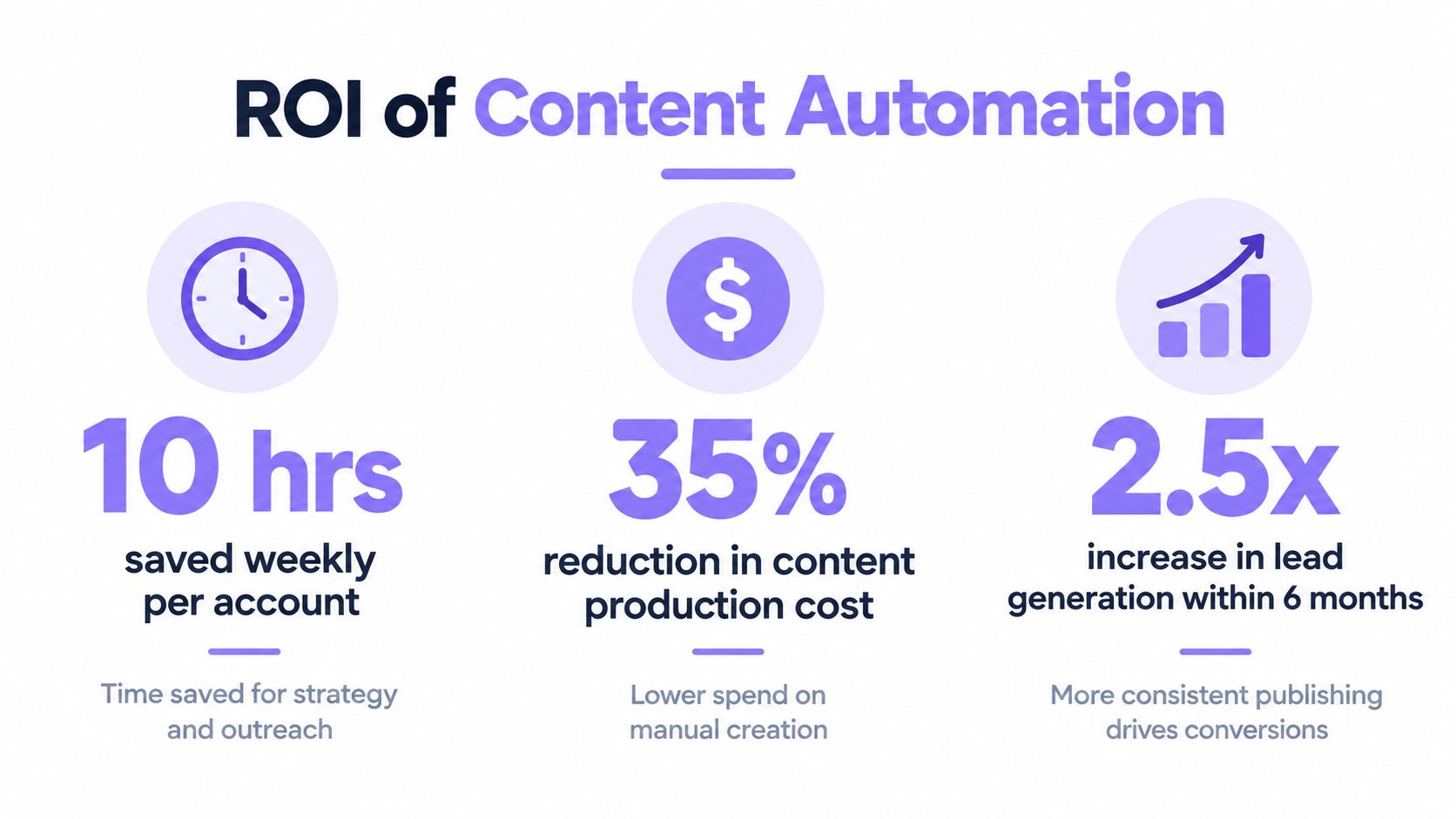
Don't measure automation by how many posts a tool produces. Measure whether your business has more time for valuable work and whether the content helps customers take meaningful next steps.
Use a simple measurement model
Track four layers in one spreadsheet or dashboard:
| Layer | What to record | Why it matters |
|---|---|---|
| Capacity | Time spent on planning, drafting, formatting, approvals, and reporting | Shows whether the workflow removes repetitive effort |
| Production | Assets completed, published, refreshed, or repurposed | Shows whether your process is reliable |
| Response | Search impressions, clicks, email actions, enquiries, and meaningful engagement | Shows whether customers interact with the content |
| Commercial outcome | Qualified enquiries, bookings, sales conversations, or purchases | Connects content activity to business value |
Record a baseline before changing the process. Compare the same content type and channel over time, and annotate outside factors such as a promotion, a seasonal change, or a website redesign. Don't claim that automation caused every improvement. It may have made consistent publishing easier, while the topic, offer, or market conditions drove the result.
Protect quality while you grow
Review a sample of published content for factual accuracy, customer relevance, duplicated ideas, broken links, and unnatural phrasing. If output increases but enquiries become less relevant, reduce volume and improve targeting. More content isn't automatically better content.
A small dashboard can show the number of items in each workflow status, overdue approvals, publishing consistency, top pages by useful action, and time spent per asset. Google Search Console and Looker Studio can provide a starting point without requiring an expensive analytics suite. For a wider framework, use this SEO KPI measurement guide to connect visibility metrics with business decisions.
Scale only after the first workflow is stable. Add another content format when the team can explain the existing process, fix common errors, and identify who owns each exception. Upgrade tools when you have a clear limitation, such as missing integrations, inadequate permissions, or reporting that takes longer to maintain than the work it measures.
This video provides additional context on measuring content automation outcomes and connecting operational improvements to marketing performance.
Your Content Marketing Automation Implementation Checklist
Treat implementation as a controlled experiment, not a complete transformation. Choose one workflow, document it, run it, and improve it before adding another.
First week
- Pick one bottleneck: Choose a task that repeats often, such as turning approved articles into social posts.
- Define one outcome: Decide whether you care most about reclaimed time, faster approvals, more consistent publishing, or better lead follow-up.
- Collect source material: Gather customer questions, existing articles, product information, brand guidance, and approved examples.
- Choose the simplest suitable tool: Start with software your team already understands where possible.
- Create one template: Include the audience, purpose, evidence, reviewer, channel, and call to action.
First month
- Map the workflow: Record every stage from idea to reporting and remove unnecessary handoffs.
- Set approval rules: Specify which content can be scheduled after review and which always needs additional expertise.
- Add tracking: Use consistent campaign names and UTM parameters so you can connect distribution with outcomes.
- Test exceptions: Reject a draft, change a date, pause a campaign, and deliberately trigger an integration failure.
- Review workload: Ask whether automation is reducing effort or moving it to maintenance.
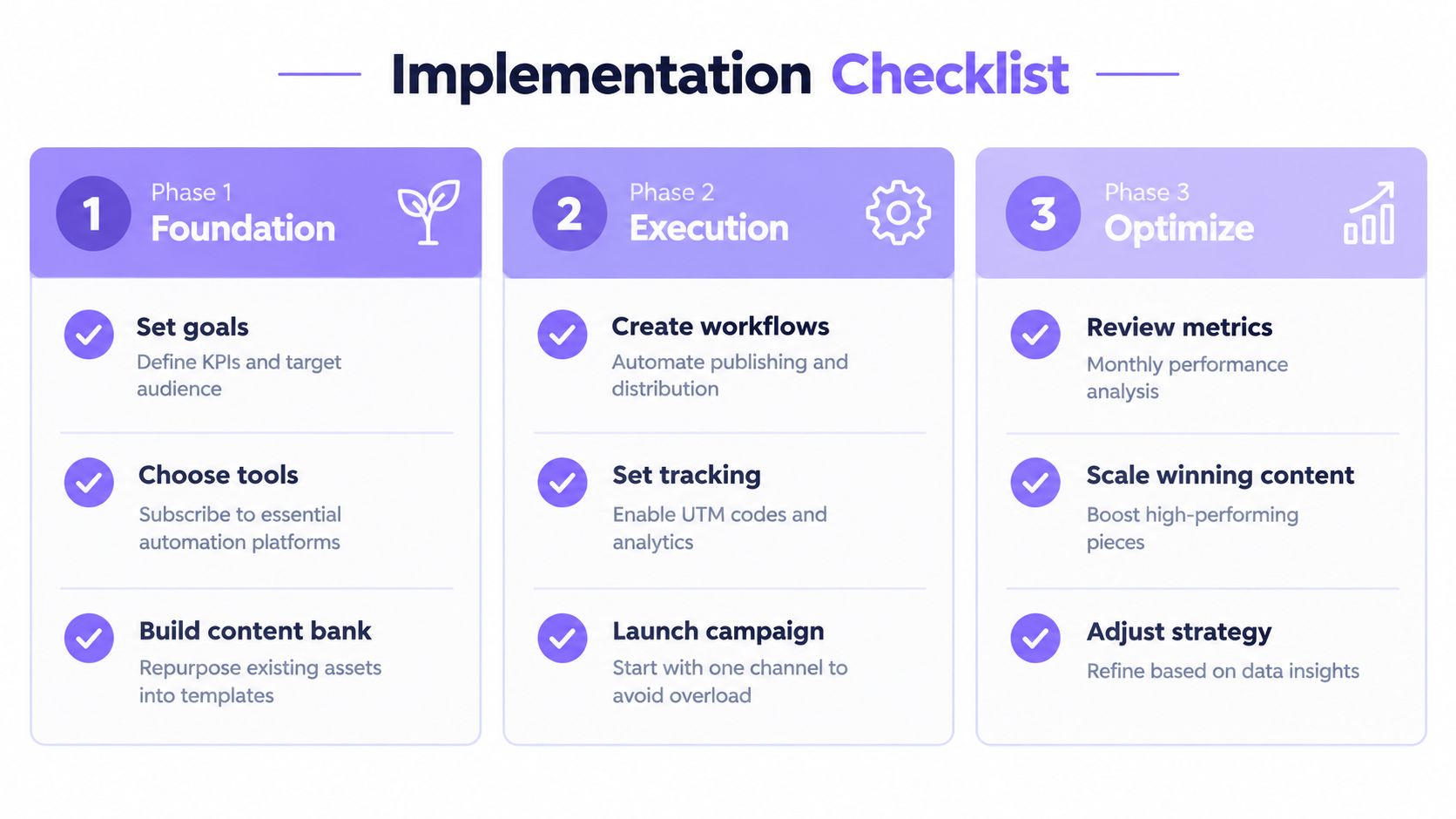
Ongoing improvement
- Review the dashboard: Look at capacity, production, response, and commercial outcomes together.
- Refresh weak content: Update information that no longer answers customer questions or reflects the current offer.
- Scale proven formats: Repurpose content that earns useful attention, not merely content that is easy to produce.
- Retire unused automations: Delete workflows nobody relies on, especially those that create duplicate notifications or stale drafts.
- Keep ownership visible: Every automated action needs a person who can explain it, pause it, and correct it.
France's AI adoption remains uneven. INSEE reports that 18% of French businesses used at least one AI technology in 2025, with adoption reaching 58% among firms with 250 or more employees. The practical lesson for an SMB isn't to imitate a large company. Build a smaller system that your team can govern, then expand only when the evidence supports it.
Start with one useful workflow and make it boringly dependable.
Wispra helps French businesses manage an AI-oriented content engine for blogs, FAQs, reviews, and product or service catalogue material, alongside an AI visibility directory and performance dashboard. If you want to connect content marketing automation with how customers discover businesses through conversational search, visit Wispra and assess whether its workflow fits your current publishing process.