
Marketing Automation for Small Business: A 2026 Guide
Learn how to plan, choose, set up and measure marketing automation for small business, with low-cost tools, workflows and KPIs for 2026.
The French marketing automation market generated USD 237.1 million in revenue in 2024, according to Grand View Research. That figure is easy to misread as a software race. For a team of one to five people, the money sits in a much smaller operating model: one list you trust, one follow-up you already do by hand, and rules for consent and exit written before you buy anything.
Marketing automation for small business fails when the owner treats it as a purchase. It works when someone owns the data, reviews the messages, and can name the result they will track.
Is Marketing Automation Worth It for a Small Team
Yes. Marketing automation is worth doing now for a small team, if you hold customer contacts in one place and already repeat at least one follow-up by hand. Marketing automation here means a message that fires from a behaviour or a date. A welcome email after sign-up, a reminder after a booking, or a chase when a quote sits unanswered. It is not a campaign someone has to remember to send.

Say a two-person bakery holds 1,200 loyalty-card contacts and sends one promotion a month. Anyone who never opens that email drops out of the relationship. A short welcome after the card is issued, and a single reminder when a regular has not visited, would recover people the monthly blast never reaches. The software is the easy part. The list is the job.
French firms are further along on customer software than the EU average, and still uneven by size. In 2025, 30.7% of French companies with at least 10 employees used CRM software, up from 24.5% in 2023, and above the EU average of 28.5%, as reported from Eurostat-based figures by Sorank. Usage was 27.1% among firms with 10 to 49 employees, 45.6% among those with 50 to 249, and 73.6% among those with 250 or more. Smaller firms can automate. Most have not centralised the customer record, so the first job is data, not a platform.
Readiness check: answer three questions before you look at pricing pages.
- One place: do you hold contacts in a single list, not split across inboxes and notebooks?
- A repeated follow-up: do you send the same chase by hand each week?
- One result: can you name the number you would track, such as replies, bookings, or recovered carts?
A yes to two of those means the rest of this guide applies to you. A yes to none means tidy the list first.
How to Build Your First 30-Day Automation Plan
In 2025, 75% of French marketers had deployed at least one automation workflow, up from 58% in 2023, so a workflow by itself no longer sets a small firm apart, according to HiCommerce. Treat the first month as a test of the operating model. Who owns the list, which event moves a person forward, and which rule takes them out: those three decisions matter more than the tool. CRM status, site events, purchases, and suppression rules then decide the next action.
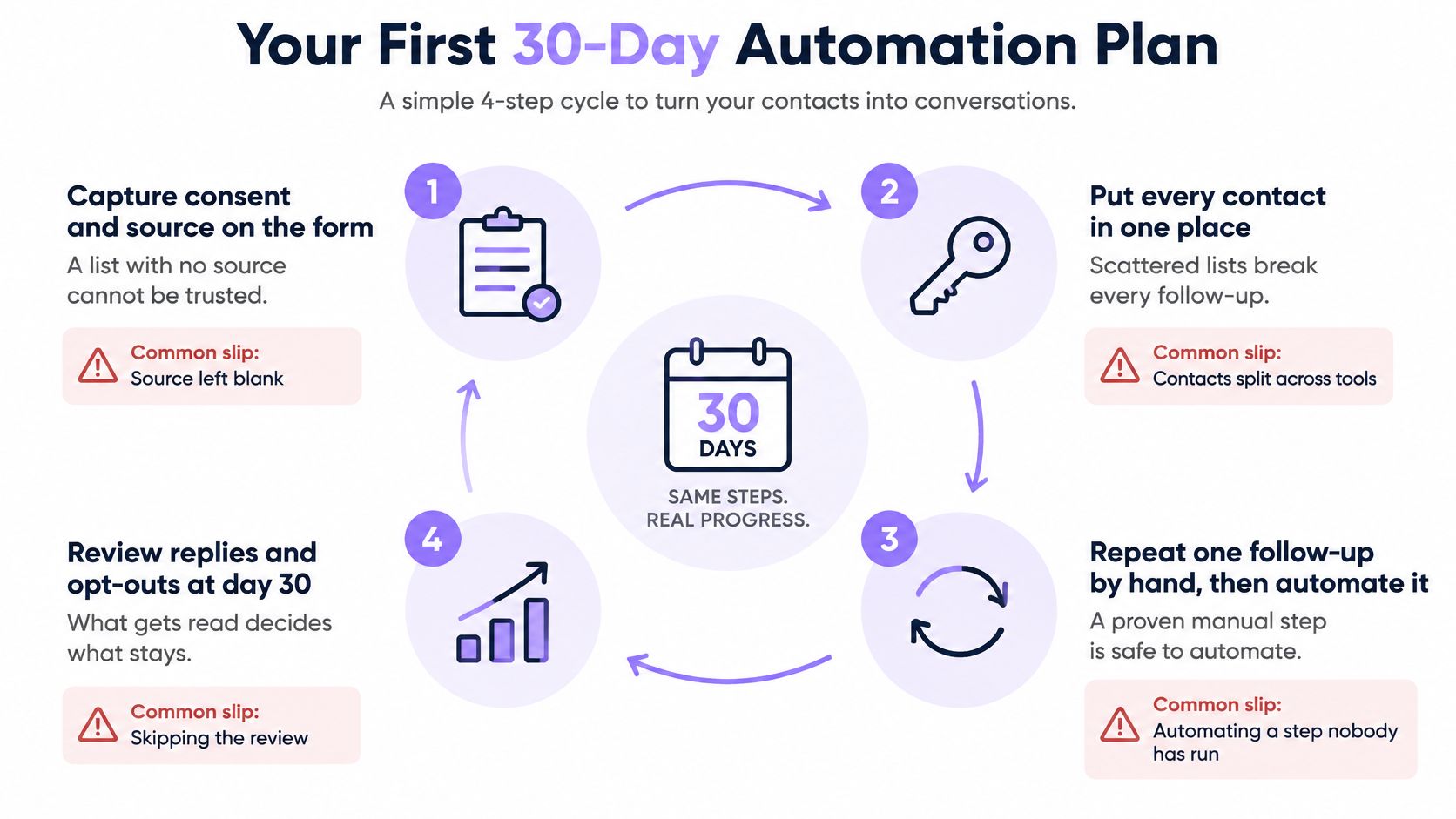
A one- to five-person team usually breaks this month on ownership, not on missing features. Freelancers hit that sooner than a shop with a counter, because one missed quote is a lost week. The same 30-day shape works for a local studio or an agent, and it pairs well with a practical playbook for freelancer marketing.
Days 1 to 10, make the list trustworthy
Write consent and source as workflow rules, not a policy nobody opens.
- Capture consent and the source on the form itself. A tick box, the date, and where the person came from (the booking page, the counter, a quote form) belong on the record at sign-up. A list with no opt-in trail cannot be repaired later. The usual slip is a source field left blank, so a later send has no lawful basis you can point to.
- Put every contact in one place and merge duplicates by email. A shared sheet is enough if a CRM feels heavy. Split records are why people get the same email twice. Deduplicate identities before you connect any trigger, and name one person who checks new rows each week.
- Segment with three or four fields only. Lifecycle stage, purchase intent, location, and last engagement. Extra tags feel clever, then nobody maintains them, and the segments drift.
Record a baseline conversion or qualified-lead rate before any variant goes live. Without that number, day 30 is an argument, not a comparison.
Days 11 to 20, one journey and a hard exit
- Build one welcome or abandoned-cart sequence of two or three emails. That is the highest-intent journey for a tiny team. Leave re-engagement, birthdays, and win-back for a later month. The slip is automating a step nobody has run by hand, so the copy and the timing have never been checked against a real reply.
- Add the suppression rule on day one of the build. Remove unsubscribed and inactive contacts, and end the sequence after a purchase or a support request. Most first builds forget the exit, so a buyer still receives "you left something behind" after they have paid.
Complex or sensitive questions still belong with a person. Keep a human handoff. A complaint, a refund, or a high-value local lead should leave the sequence and land with a named owner, with a due date on that owner's list. Use a frequency cap so a click and a purchase on the same afternoon do not stack three emails.
Days 21 to 30, one change and a pre-set window
- Split the sequence into a control and one variant. Change a single variable: subject line, offer, delay, message length, or call to action. If you change two things, you will not know which one moved the result.
- On day 30, compare conversion or qualified-lead rate inside a window you chose before launch. Do not pick the window after you have seen the numbers. Do not call it a win on open rate alone.
Generative tools can shorten a first draft of those emails. Speed does not replace a read-through for facts, brand voice, and legal wording. Review every generated line before it sends, and keep the person who owns the list as the person who approves the copy.
I would stop at one live workflow. A working first month looks plain: a clean list, a named owner for the handoff, and one written decision for month two (keep the variant, revert to the control, or fix the data). Validate event timestamps so a late import does not restart a sequence someone already finished.
Choosing a Tool Stack That Fits a Team of One to Five
Start with the job, then the minimum data, then the category. Compare brands only inside the category you have already chosen. France's 2025 Digital Decade figures show that only 17.01% of French SMEs used AI, below the EU SME average of 18.9%, while the 2025 France Num barometer found that 37% of VSEs and SMEs had difficulty finding a suitable digital service provider, up 15 percentage points year over year, and that 25% had no budget allocated to digital projects, as set out in the European Commission country report. A tool that needs a dedicated administrator will stall after month one.
| Tool category | Best first use | Data it needs | Set-up effort |
|---|---|---|---|
| Shared sheet with an email tool | One welcome email and a reminder | Name and email only | Low, but manual upkeep |
| Email platform with built-in automation | Welcome, cart and re-engagement flows | Contacts plus sign-up or purchase events | Moderate |
| Lightweight CRM with pipeline | Lead follow-up and reminders | Contacts, deal stages and notes | Moderate, needs weekly upkeep |
| Booking or e-commerce platform with triggers | Confirmations, reminders and post-purchase emails | Orders or bookings | Low if already in use |
| Full marketing automation suite | Multichannel journeys and lead scoring | Large clean dataset and an administrator | High; usually more than a team under 10 needs |
What actually decides the shortlist
For a team this small, four checks matter more than feature grids.
- Export: can you take contacts out in a standard file if you leave?
- Storage and language: do you know where the data sits, and can a non-technical owner use the screens and the support?
- Pricing shape: does the bill rise with contacts, with automations, or with both?
- Add-ons: will the first workflow run on the base plan?
Price every shortlisted tool at 1,000 contacts and at 5,000 before you sign. Favour the plan that runs the first workflow without paid extras. A longer map of categories sits in this round-up of digital marketing tools for small business.
Say a freelance photographer holds 300 past clients and a booking page. They need an email tool with a sign-up trigger and a reminder, not a CRM pipeline and not lead scoring. The booking platform may already send the confirmation. If it does, do not buy a second system to repeat it.
Must-haves: export of contacts, a consent or source field, and an exit rule you can set without a developer. Nice-to-haves: a visual journey builder, extra channels, and predictive send times. Reject anything that fails a must-have before you book a demo. Lead scoring and multichannel journeys are a later problem, once one follow-up already saves time and recovers enquiries you used to miss.
KPIs and Benchmarks That Show Whether Automation Works
Open rate is a weak referee. Use the French baselines below as a sense check, then judge the workflow on conversion and money.
| Metric | Benchmark | How to read it |
|---|---|---|
| Open rate, all sectors | 33.9% average | Directional only; privacy protections distort opens |
| Click rate, all sectors | 2.7% average | A better engagement signal than opens |
| Open and click rate, e-commerce | 28.96% opens; 2.1% clicks | Use for comparisons with online shops |
| Abandoned-cart recovery | 10-15% of carts | A revenue lever; measure revenue, not only clicks |
| Welcome email open rate | 86% | Shows timing and declared intent, not send volume |
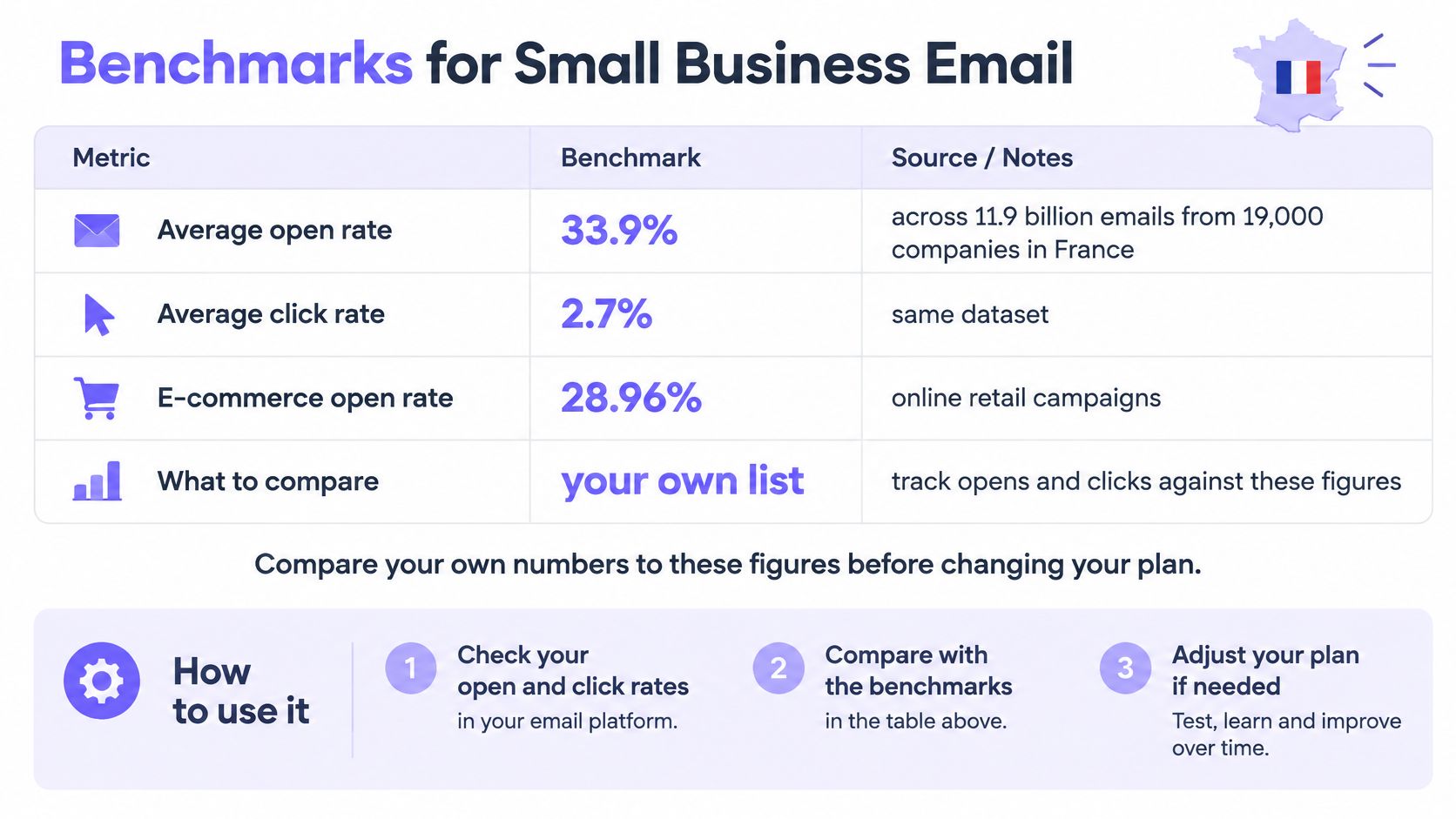
Those opens and clicks come from a France-focused benchmark of 11.9 billion emails across 19,000 companies: a 33.9% average open rate and a 2.7% average click rate, with e-commerce at 28.96% opens and 2.1% clicks, published by Ediware. The same set of operating figures puts French cart recovery at 10–15% and welcome opens as high as 86%. Timing and declared intent beat extra volume. None of these are targets you must hit. A niche list can sit well below the average and still pay for itself.
What to measure, and which rung should move
Track five numbers, each by segment: delivery, click-through, conversion, revenue per recipient, and unsubscribe rate. Read them as a short ladder.
- Visibility or reach. Did the message arrive?
- Qualified interaction. Did the right people click or reply?
- Lead or visit. Did that interaction become a conversation or a footfall?
- Commercial conversion. Did it become revenue?
- Retained customer. Did they come back without another manual chase?
The first workflow should move one rung you can count, usually qualified interaction into a lead, a visit, or a recovered order. Do not declare success because the open rate looked close to 33.9%.
Say a boutique sends a welcome series and sees 40 unsubscribes per 1,000 sends. Before anyone rewrites the subject line, split that 40 by segment. If one imported list or one offer produces most of the opt-outs, the diagnosis is the audience, not the wording. Identical content to every contact hides that split. So does a sequence with no exit after a purchase or a support ticket.
Write one baseline number in a dated note before the first send: replies per 100, bookings per 100, or revenue per recipient. Day 30 only means something against that note.
Compliance and Data Rules That Keep Automation Safe
The safest automation usually personalises less, not more. Many smaller French firms still run from spreadsheets, inboxes, and booking tools. In 2025 only 27.1% of companies with 10 to 49 employees used CRM software, against 45.6% of firms with 50 to 249 employees and 73.6% of larger companies, in the picture drawn by Businesscoot. Duplicate rows, unclear consent, and long retention are easy in that setup. Collect only the fields a stated purpose needs. When the record is weak, use a broad audience rule instead of a clever one.
| Situation | Safe default | Who decides |
|---|---|---|
| Purchased or rented contact list | Do not import it | Not a judgement call; leave it out |
| Existing customer, similar product | Check whether the existing-customer exception applies and record why | You, with a written note |
| Contact with no recorded consent source | Suppress until consent is confirmed | You |
| Contact asks to stop or exercises a data right | Action it promptly and log the date | You, within an internal deadline |
| Complaint, refund or sensitive question | Route to a person within one working day | A named human |
A review request stops once a customer reports a bad experience. An inactive lead should leave the sequence once you hit a retention limit you wrote down, rather than sitting in a nurture forever. These are operating choices to document. A legal adviser should confirm the edge cases, including how a similar-product email sits under French and EU rules.
Two habits keep the workflow honest. Review every generated message before it goes out. Keep a one-page log of where each contact's consent came from. If you also measure site behaviour, read how pixel tracking works and when it is lawful before you add another tag.
Confirm the First Workflow Before You Buy Any Tool
Pick the one workflow from the 30-day plan and write three lines before you compare tools: who owns the data, who reviews the content each month, and what the suppression and escalation rules are. Then record a baseline number and a consent source for the list you already hold, both in a dated note. Buying software does not create either line.
A photographer with 300 past clients, a welcome email, a booking reminder, and a consent note has a first workflow. A photographer with two spreadsheets and no consent sources does not. The second case needs a cleanup weekend, not another subscription.
If the first workflow runs for 30 days with a clean list and a recorded baseline, add the second workflow. If it does not, fix the data before you buy more software.
Put the day-30 review in the calendar on the day you launch, so you use the comparison window you chose.
The same restraint applies outside email. We publish a directory profile and an AI visibility report on the free plan, at no cost and with no credit card, and we do not install anything or change the customer's website. We also do not promise how long it takes for a business to be cited by AI engines. Visibility work still starts with a clean public record and a date you will look again, not with a larger stack.
If the follow-up you already send by hand is the thing you want found when people ask an AI assistant for a local business, put that offer where those engines can read it. Wispra publishes a free directory profile and an AI visibility report, with nothing to install and no card required, so you can see how you currently show up before you add another marketing tool.